 88aa6098f0
* refactor(a11y): comprehensive WCAG 2.2 AA accessibility improvements

Add skip-to-content link, landmark regions, ARIA attributes, keyboard
navigation, focus styles, reduced-motion support, and i18n keys across
all layouts, partials, shortcodes, and JS components.

- Add skip nav link in baseof.html and id="content" on all <main> tags
- Fix 404 page lang/dir attributes and add <main> landmark
- Add aria-label to banner close, PDF iframe, search input/results
- Remove aria-hidden from back-to-top button
- Add aria-hidden to decorative external link icon
- Add role="tablist" to tabs, aria-expanded to filetree/dropdowns
- Wrap mermaid diagrams in role="img", asciinema in role="region"
- Change theme toggle <p> items to <button role="menuitem"> with
  full keyboard navigation (Arrow/Home/End/Escape)
- Add arrow-key keyboard navigation to tabs component
- Separate sidebar collapsible button from link for independent
  keyboard access with aria-expanded sync
- Sync aria-expanded on all dropdown toggles (theme, lang, navbar,
  hamburger, page context menu)
- Add aria-live search status announcements
- Add 13 new i18n keys, replace hardcoded aria-label strings
- Add prefers-reduced-motion CSS override and focus-visible base styles
- Add aria-label swap on code copy ("Copied!" feedback for AT)
- Add aria-current to active TOC links
- Wrap filetree in <ul> container for proper list semantics
- Add unique aria-label to blog "Read more" links
- Document accessibility guidelines in AGENTS.md

* feat(a11y): enhance focus styles and accessibility for various components

- Add focus-visible styles to badges, buttons, and links for improved keyboard navigation.
- Update breadcrumb, sidebar, and TOC components to include focus-visible outlines.
- Introduce new classes for focus states in the badge and tabs shortcodes.
- Ensure consistent focus styles across all interactive elements to meet WCAG 2.2 AA standards.

* feat(a11y): implement new focus-visible utilities and enhance accessibility styles

- Introduce new utility classes for focus-visible states to improve keyboard navigation.
- Update various components including badges, buttons, and search inputs to utilize new focus-visible styles.
- Refactor existing focus styles to ensure consistency and compliance with accessibility standards.
- Enhance breadcrumb, sidebar, and TOC components with updated focus-visible classes for better user experience.

* chore: add .gitattributes to collapse generated files in PR diffs

* fix: enhance accessibility and improve documentation

- Added alt attributes to images in multiple language documentation files for better accessibility.
- Updated the navbar title partial to remove unnecessary title attribute.
- Improved search input accessibility by adding autocomplete="off".
- Enhanced search partials in both navbar and sidebar with location context.
- Updated SVG icons in various components to include aria-hidden and focusable attributes for improved accessibility compliance.

* fix: improve giscus theme toggle functionality

- Updated the theme toggle options selector to use a data attribute for better specificity.
- Modified the event listener to use a setTimeout for the theme update, ensuring smoother transitions when the theme switcher is clicked.

* fix: resolve axe-core WCAG AA violations across docs pages

Add aria-labels to Hugo task list checkboxes, fix asciinema player
timer accessible names, make Jupyter output cells keyboard-focusable,
and add missing heading hierarchy in shortcodes docs for fa/ja/zh-cn.

* feat: integrate accessibility testing with Playwright and enhance CI workflow

- Added Playwright configuration for accessibility testing.
- Implemented accessibility tests using axe-core for all English pages.
- Created a GitHub Actions workflow to automate accessibility tests on pull requests.
- Updated package dependencies to include @axe-core/playwright and @playwright/test.
- Enhanced sidebar component with data attributes for improved accessibility styling.

* fix: update base URL and improve accessibility labels across multiple languages

- Changed the base URL in Playwright configuration and CI workflow from localhost:3000 to localhost:1313.
- Added accessibility labels for screen readers in various language files, enhancing user experience for visually impaired users.
- Updated the Asciinema script to dynamically set the playback time label for better accessibility compliance.

* refactor: reorganize accessibility tests and update test directory structure

- Moved accessibility tests from the e2e directory to a new tests directory for better organization.
- Updated the test directory path in Playwright configuration.
- Refactored the accessibility test implementation to improve code clarity and maintainability.

* chore: update .gitignore to include Playwright test output directories

- Added entries for 'playwright-report/' and 'test-results/' to the .gitignore file to prevent cluttering the repository with test artifacts.

* refactor: enhance accessibility and improve focus styles across components

- Removed unused utility for focus visibility in CSS and consolidated focus-visible styles for better maintainability.
- Updated various components to use `role` attributes for improved accessibility, including menu items and buttons.
- Enhanced theme toggle and language switch components with appropriate ARIA roles and attributes for better screen reader support.
- Improved the handling of focus states in the navigation and context menus to ensure a consistent user experience.

* chore: update dependencies and enhance accessibility features

- Updated the 'serve' package version in package.json and package-lock.json for improved performance.
- Removed unused 'xml2js' dependency to streamline the project.
- Enhanced the Playwright configuration to better manage the web server setup for testing.
- Improved accessibility in the language switcher and navigation menu by refining focus management and keyboard interactions.
- Updated the back-to-top button to manage tabindex for better accessibility compliance.

* feat: enhance mobile menu accessibility and keyboard interactions

- Added ARIA attributes to manage visibility of the sidebar on mobile devices.
- Implemented focus management for the sidebar when the menu is toggled.
- Introduced keyboard support to close the menu with the Escape key.
- Improved overall accessibility for the hamburger menu and sidebar interactions.

* fix: refine mobile menu keyboard interaction and enhance navbar accessibility

- Updated the Escape key functionality to close the menu only on mobile devices.
- Added a new ARIA attribute to the hamburger menu button for improved accessibility.
4.7 KiB
title, weight, tags, next, prev
| title | weight | tags | next | prev | ||
|---|---|---|---|---|---|---|
| 快速开始 | 1 |
|
/docs/guide | /docs |
从模板快速启动
{{< icon "github" >}} imfing/hextra-starter-template
您可以通过使用上述模板仓库快速开始。
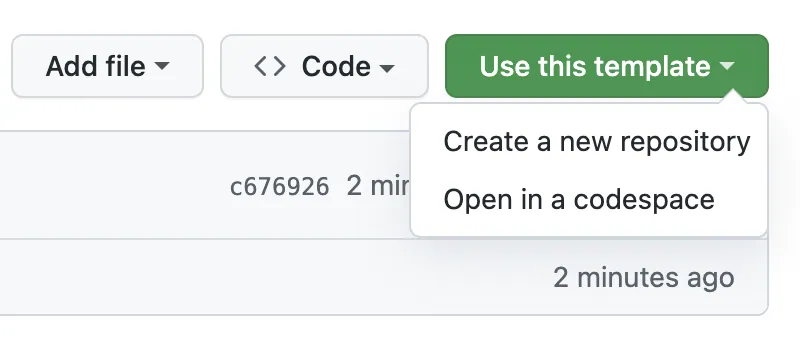
我们提供了一个GitHub Actions工作流,可以帮助自动构建并将您的站点部署到GitHub Pages,并免费托管。 更多选项,请查看部署站点。
作为新项目启动
有两种主要方式将Hextra主题添加到您的Hugo项目中:
-
Hugo模块(推荐):最简单且推荐的方法。Hugo模块允许您直接从在线源拉取主题。主题会自动下载并由Hugo管理。
-
Git子模块:或者,将Hextra添加为Git子模块。主题由Git下载并存储在项目的
themes文件夹中。
将Hextra设置为Hugo模块
先决条件
在开始之前,您需要安装以下软件:
步骤
{{% steps %}}
初始化一个新的Hugo站点
hugo new site my-site --format=yaml
通过模块配置Hextra主题
# 初始化Hugo模块
cd my-site
hugo mod init github.com/username/my-site

# 添加Hextra主题
hugo mod get github.com/imfing/hextra
配置hugo.yaml以使用Hextra主题,添加以下内容:
module:
  imports:
    - path: github.com/imfing/hextra
创建您的内容页面
为主页和文档页面创建新内容:
hugo new content/_index.md
hugo new content/docs/_index.md
本地预览站点
hugo server --buildDrafts --disableFastRender
恭喜,您的新站点预览可在http://localhost:1313/查看。
{{% /steps %}}
{{% details title="如何更新主题?" %}}
要更新项目中的所有Hugo模块到最新版本,运行以下命令:
hugo mod get -u
要将Hextra更新到最新发布版本,运行以下命令:
hugo mod get -u github.com/imfing/hextra
更多详情请参阅Hugo模块。
{{% /details %}}
将Hextra设置为Git子模块
先决条件
在开始之前,您需要安装以下软件:
步骤
{{% steps %}}
初始化一个新的Hugo站点
hugo new site my-site --format=yaml
将Hextra主题添加为Git子模块
切换到站点目录并初始化一个新的Git仓库:
cd my-site
git init
然后,将Hextra主题添加为Git子模块:
git submodule add https://github.com/imfing/hextra.git themes/hextra
配置hugo.yaml以使用Hextra主题,添加以下内容:
theme: hextra
创建您的内容页面
为主页和文档页面创建新内容:
hugo new content/_index.md
hugo new content/docs/_index.md
本地预览站点
hugo server --buildDrafts --disableFastRender
您的新站点预览可在http://localhost:1313/查看。
{{% /steps %}}
当使用CI/CD部署Hugo网站时,确保在运行hugo命令之前执行以下命令至关重要。
git submodule update --init
如果不运行此命令,主题文件夹将不会被填充Hextra主题文件,导致构建失败。
{{% details title="如何更新主题?" %}}
要更新仓库中的所有子模块到最新提交,运行以下命令:
git submodule update --remote
要将Hextra更新到最新提交,运行以下命令:
git submodule update --remote themes/hextra
更多详情请参阅Git子模块。
{{% /details %}}
下一步
探索以下部分以开始添加更多内容:
{{< cards >}} {{< card link="../guide/organize-files" title="组织文件" icon="document-duplicate" >}} {{< card link="../guide/configuration" title="配置" icon="adjustments" >}} {{< card link="../guide/markdown" title="Markdown" icon="markdown" >}} {{< /cards >}}